
On this page
01 How it works
Millions of people trade currencies, gold and indices on MetaTrader 4 and 5, the most widely used trading platforms among retail brokers. MetaTrader can run small add-on programs. There are three kinds: indicators (they draw something on the chart, like a line, a zone or a signal), utilities (helpers like a risk calculator or a trade manager that moves your stop-loss for you) and Expert Advisors, or EAs (programs that open and close trades on their own). They are written in the programming languages MQL4 and MQL5.
Here is the key idea of this opportunity: you are the tool maker, not the trader. You don’t earn money by trading. You earn it by building tools that make trading easier, safer or more organized for other people — and selling them. The main shop for this is the MQL5 Market, a store built into MetaTrader itself. Traders find your product inside their platform, try a demo and buy it there. AI tools like ChatGPT or Claude now write, explain and fix a large part of the code with you.
- Find a real trader problem
- Write a clear spec
- Build with AI help
- Test on demo & tester
- Publish on the Market
- Support & update
Three ways to earn with the same skill:
02 Is this for you?
- like logic, puzzles and making things work step by step
- know trading basics or are willing to learn how traders actually work
- are patient with testing — and re-testing
- can explain things clearly to confused customers
- want products you build once and improve over time
- hope to get rich by selling a “money machine”
- hate error messages and debugging
- don’t want to answer support questions
- see this as a shortcut to trading profits yourself
- are not willing to write honest, boring disclaimers
03 The “saturated” myth — where the money really is
Open the MQL5 Market and you’ll see thousands of products. Many are EAs with dramatic names, perfect-looking equity curves and loud promises. That looks like a crowded, noisy place. It is — at the loud end. The quiet end is where honest tool makers do well: small, well-built utilities that do one job perfectly. Traders are tired of hype. A tool that simply works, is clearly explained and gets updated earns trust — and reviews.
The money sits in three places:
- A sharp problem — not “a better indicator”, but “draws the London session range and alerts me on a break”. One clear job.
- Quality you can see — clean chart graphics, no lag, sensible defaults, works on every symbol and timeframe, a clear manual.
- Consistency — fast answers to buyer questions, regular updates, honest screenshots. On the Market, reviews and ratings decide who gets found.

I build trading tools myself, like an opening-range-breakout EA. The most valuable thing isn’t a secret strategy — it’s a tool that does exactly what it says, reliably, every day. People underestimate how many traders just want the boring parts done for them.
Broad vs. sharp: what a good tool looks like
04 What AI changes
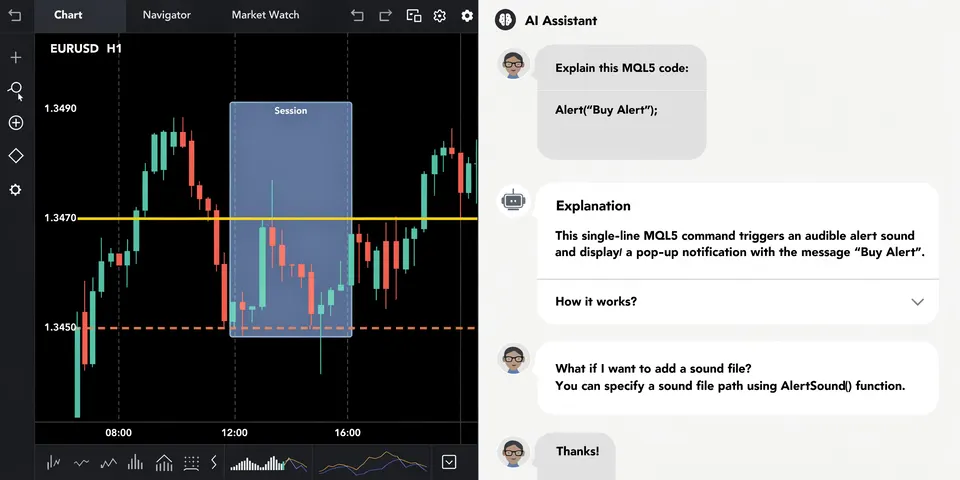
Until recently you needed months of programming practice before you could build even a small MetaTrader tool. MQL is a niche language, the documentation is dry, and one missing detail breaks everything. Today an AI assistant writes a first version of your indicator in minutes, explains every line in plain English and helps you find the bug when something goes wrong. That makes this opportunity open to people who are not programmers — if they are willing to learn along the way.
What AI does not change
AI can’t find a profitable strategy for you, and it can’t tell you whether an EA will make money in the future. Nobody can. A backtest (a simulation of how a strategy would have traded in the past) with AI-tuned settings often looks fantastic and then fails in live markets — this is called overfitting: the settings fit the past perfectly and nothing else. That is exactly why this article focuses on utilities and indicators first. Their value is easy to check: either the lot size is calculated correctly or it isn’t.
05 Step by step — the complete process
All ten steps from the first idea to your first sold tool and custom jobs. Plan a few months if you work on it in the evenings — a lot of that time is learning and testing, and that time is well invested.
This is the most important step. Honestly: don’t start with “what could I code?”, start with “what annoys traders every day?”. Research like a buyer:
- Browse the MQL5 Market by category (utilities, indicators). Which tools have many reviews? What do negative reviews complain about — bugs, lag, no support, missing features?
- Read the MQL5 Freelance section: traders describe exactly what they want built, in their own words. Repeated requests are product ideas.
- Read trading forums, Reddit trading communities and YouTube comments under MetaTrader tutorials. Note phrases like “I wish there was…”.
- Look at your own trading or a friend’s: which clicks, calculations or checks are repeated every day?
You don’t need a computer science degree, but you need to understand what you sell. Install MetaTrader 5 with a free demo account from a regulated broker and open MetaEditor, the built-in code editor. Then learn the building blocks with AI explaining each one:
- How an indicator draws on the chart (buffers, objects like rectangles and lines).
- How MetaTrader reacts to new prices (the “tick” events) and to clicks on the chart.
- How orders work: market orders, stop-loss, take-profit, lot sizes, the difference between symbols.
- Start with MQL5 unless your buyers clearly use MetaTrader 4 — many brokers still offer both.
A spec (specification) is a short document that says exactly what the tool does. It is the single best way to get good code from AI — and to avoid disputes in custom jobs. Include: purpose in one sentence, input settings with default values, what appears on the chart, alerts, and what happens in edge cases (market closed, no internet, symbol with unusual digits, account in a different currency).
Give the AI your spec and ask for MQL5 code. Paste it into MetaEditor, compile, and bring every error message back to the AI. Build in small pieces: first draw the box, then add the alert, then the settings panel. Ask the AI to comment the code so you understand it.
And most one-star reviews come from tools that were never tested properly. Before anyone sees your product:
- Run it on a demo account for days, on different symbols (forex majors, JPY pairs, gold, an index) and timeframes.
- Use the Strategy Tester in visual mode to watch it work on historical data.
- Test the ugly cases: restarting MetaTrader, changing timeframe, weekend gaps, a broker with suffixes like “EURUSD.pro”.
- For anything that places orders: check lot size limits, free margin checks and what happens if an order is rejected.
- Ask 3–5 traders to test it for free in exchange for honest feedback.
To sell on the MQL5 Market you register as a seller, which includes identity verification. Every product then goes through an automatic check (the platform runs your file in the tester on different symbols and timeframes and rejects it if it crashes, runs into errors or — for EAs — fails basic trading checks) plus a moderator review of the product page. Typical rejection reasons in the forums: missing margin or volume checks, errors on unusual symbols, and texts that are too promotional.
- No DLL calls and no third-party licensing systems — the Market handles protection and activations itself.
- No links to outside websites or personal contact details in the description.
- No profit promises in the name, text or images, and backtests must not be presented as real trading results.
- A free demo version is created from your product so buyers can test it in the tester first.
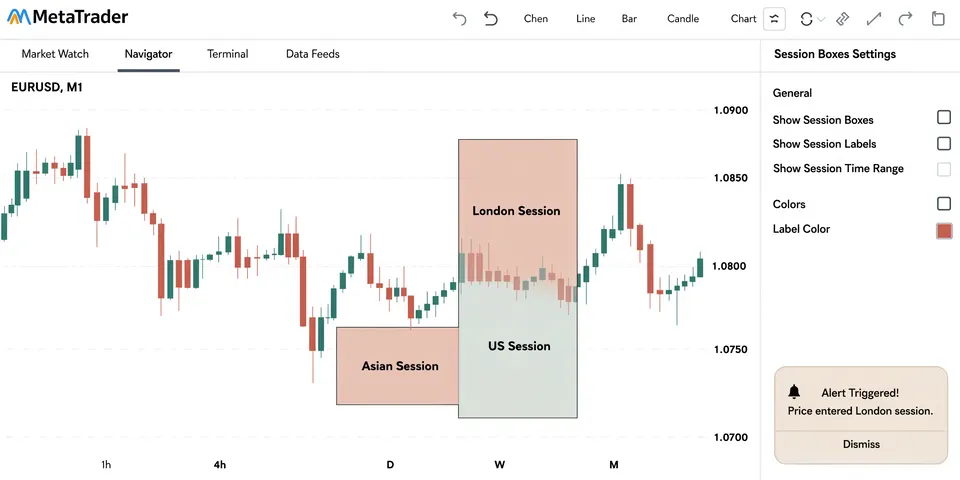
Your description sells the tool — and it protects you to. Explain what it does, for whom, every input setting, limitations and a short “how to start” guide. Use real screenshots from MetaTrader; for the banner image, AI-made graphics are fine as long as they don’t show fake profits or results.
Expert Advisors sell well — and attract the most disappointed buyers. If you publish one, treat it as a tool for traders who want to test an idea, not as a money machine:
- Explain the logic in plain words (e.g. “trades a breakout of the first hour’s range”). No “secret AI” black box.
- Show backtests with realistic spreads and commissions, clearly labeled as simulations — including the bad periods and the maximum drawdown (the biggest drop from a high).
- Avoid risky money management like martingale (doubling the position after each loss) or grid systems without clear warnings; they can look great for months and then wipe out an account.
- Say clearly: past results don’t predict future results, and the buyer can lose money. Recommend demo testing first.
Selling a trading tool is a service, not a one-time upload. Buyers will ask how to install it, why an alert didn’t fire, whether it works with their broker. The MQL5 Market expects sellers to help with correct use and to fix critical errors, and communication runs through the platform. Build a short FAQ, keep a changelog, answer within a day, and update your products when MetaTrader changes. Every calm, helpful reply is a future five-star review.
Your products are your portfolio. With a few solid tools you can take custom orders, for example in the MQL5 Freelance section. There, the customer and developer agree on a written requirements specification, the money is reserved in advance and released after the work is accepted; disputes are decided based on that specification. Work and payment must stay on the platform. Take jobs you can really deliver, write the spec together carefully, and never promise that the customer’s strategy will be profitable — you code their rules, nothing more.
06 Tools
Research first — it decides whether anyone needs your tool. Coding tools you can swap later.
07 Realistic expectations
Honestly: your first product will take longer than you think, and your first weeks on the Market may be quiet. New sellers have no reviews, and the store is full of loud competitors. What works is a small portfolio of honest, well-tested utilities, each with a clear job, plus good support and regular updates. Sales tend to grow as reviews build up and as your tools start to recommend each other. Custom jobs can bring the first money sooner, but they are active work — no job, no income. Nobody can tell you how much you will earn, and anyone who promises figures is selling you something.
08 Tips & common mistakes
- Do: Start with utilities — their value is easy to prove and hard to argue with.
- Do: Write a spec before every tool and every custom job.
- Do: Test on many symbols, timeframes and brokers before submitting.
- Do: Put a clear risk note in every product and answer support within a day.
- Avoid: Names or texts with “profit”, “guaranteed”, “no loss” — dishonest and against the rules.
- Avoid: Showing a backtest as if it were real trading, or hiding the bad periods.
- Avoid: Martingale or grid EAs sold as “safe” — they can wipe out accounts.
- Avoid: Shipping AI-written code you haven’t understood and tested.
09 Pros & cons
- Very low start costs, free platform and demo accounts
- Buyers find you inside MetaTrader
- AI makes coding accessible to non-programmers
- Build once, sell many times, improve over time
- Custom jobs add income and ideas
- Steep learning curve at the start
- Support and updates never stop
- Loud, hype-driven competition
- Platform rules and approval can change
- Unhappy buyers if markets go against them
10 Risks & legal
- No profit promises, ever: Claiming or suggesting guaranteed returns is misleading and breaks marketplace rules. The MQL5 Market prohibits names, descriptions and images that promise profit and forbids presenting backtests as real trading. TradingView requires vendors to avoid misleading performance claims.
- Risk disclaimers: Every product should say clearly that trading involves a high risk of loss, that past or simulated results don’t predict the future, and that the buyer is responsible for their own trading decisions.
- Not investment advice: Sell software, not trading decisions. Don’t tell buyers what to trade or how much to invest. Offering personal investment advice or managing money for others can require a licence in many countries.
- Platform rules: MQL5 requires seller verification, an automatic product check and support through the platform; outside links and personal contact details in descriptions are not allowed. On TradingView you need a paid plan to publish invite-only scripts, must follow the script publishing and vendor rules and may only advertise in specific places. Rules change — read the current versions.
- Copyright & code: Don’t resell other people’s code, decompiled products or free scripts under your name. Check licences of any open-source code you reuse.
- Custom jobs: Agree on a written spec, keep work and payment on the platform, and clarify who gets the source code.
- Taxes: Your sales and job earnings are income. Check registration and tax rules where you live.
General information, not legal or financial advice. Education, not financial advice.
11 FAQ
Do I need to be a profitable trader to do this?
No. You sell tools, not trading results. You need to understand how traders work and what they need — but a lot-size calculator is just as useful whether its maker trades or not.
Can I really build MetaTrader tools with AI if I can’t code?
Yes, small and medium tools — if you are patient. AI writes the first drafts and explains errors. You still need to learn the basics, understand what the code does and test everything carefully. Expect mistakes in AI code, especially mixing MQL4 and MQL5.
Should I sell an EA that made great profits in my backtest?
Be very careful. Backtests are simulations and easily overfitted. If you publish an EA, explain the logic, show realistic tests including bad periods, avoid martingale-style risk and never promise profit. Utilities are the more honest first product.
MQL5 Market or TradingView?
The MQL5 Market is built into MetaTrader and handles payments, demos and copy protection. TradingView uses its own language (Pine Script), requires a paid plan for invite-only scripts and has strict vendor rules. Many tool makers start with MetaTrader and add TradingView later.
How much support will I have to give?
More than you expect, especially at the start: installation questions, broker differences, feature requests. A good manual, an FAQ and clear defaults reduce it a lot. Plan support time into every product.
The Trading Tool Maker Kit
- 30 tool ideas traders actually ask for
- Tool spec template (inputs, outputs, edge cases)
- AI prompt pack for MQL5 coding & debugging
- Pre-submission test checklist for the MQL5 Market
- Honest product description template + risk disclaimer
- Support & update log template