
On this page
01 How it works
A trading bot is a small program that watches a market — a currency pair, a stock index, gold, a crypto coin — and places trades for you when certain conditions are met. In MetaTrader it’s called an Expert Advisor (EA). On TradingView it’s a strategy written in Pine Script. Other people write bots in Python and connect them to a broker or exchange.
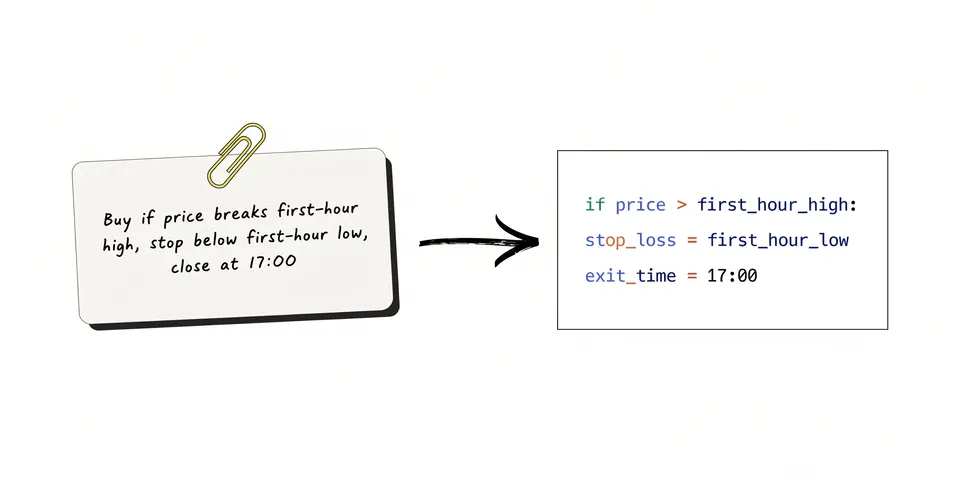
A bot doesn’t “know” where prices will go. It only follows your rules, exactly and without emotion. For example: “If the price breaks above the high of the first hour, buy. Put the stop-loss below the low of that hour. Close the trade at the end of the day.” If your rules are good, the bot executes them well. If your rules are bad, the bot loses money very consistently.
Until recently, you needed to be a programmer to turn such rules into code. Today you can describe your rules in plain English and an AI assistant writes the first version of the code. That’s the big change — and also the big trap, because working code is not the same as a working strategy.
- Learn the basics
- Write simple rules
- Code it with AI
- Backtest honestly
- Demo test for months
- Tiny live size + risk rules
- Review & improve
Three realistic ways to approach it:
02 Is this for you?
- are curious how markets and computers work
- enjoy puzzles, testing and keeping records
- can spend months on a demo account without real money
- only ever risk money you can truly afford to lose
- see learning and building tools as a win in itself
- need income soon or want to “replace your salary”
- would trade with savings, loans or money for rent
- get stressed or angry when you lose money
- hope AI will find a secret money machine
- don’t want to learn at least the basics of trading
03 Why this is a Yellow Flag
We’re not rating this red, because building a bot yourself can be a great learning project and can lead to real skills and products. But we can’t rate it green either. Here’s why.
1. Most retail traders lose money
When the European Securities and Markets Authority (ESMA) restricted CFDs for private traders in 2018, it reported that 74–89 % of retail CFD accounts typically lose money. A CFD is a “contract for difference” — a product that lets you bet on price moves with borrowed money. Since then, EU-regulated CFD brokers must show a warning with their own current loss rate on their website. Look at a few: the figure is usually well above half. A bot doesn’t change these odds by itself. It just makes decisions faster.
2. Overfitting: the backtest looks perfect, the future doesn’t care
A backtest runs your bot over past prices to see what would have happened. The problem: if you keep tweaking settings until the past looks great, you end up with a bot that is fitted to old noise. Traders call this overfitting or curve-fitting. It is the most common way home-made bots fail. With AI, it gets even easier — you can test hundreds of variations in an evening and “find” one that looks brilliant purely by chance.
3. Leverage makes small mistakes big
With leverage, you control a bigger position than the money in your account. EU rules limit this for private traders — for example to 30:1 on major currency pairs and less on riskier markets — but even 30:1 means a 1 % move against you can cost 30 % of the money behind that trade. A bug in your code, a missing stop-loss or a weekend price gap can do real damage.
4. You will want to overrule your bot
After three losses in a row, most people switch the bot off — often right before it would have recovered. Or they increase the size after a few wins. This emotional override ruins many strategies that were fine on paper.
5. The market for “AI trading bots” is full of scams
The US Commodity Futures Trading Commission (CFTC) published an advisory in 2024 with a clear title: “AI Won’t Turn Trading Bots into Money Machines.” It warns about sellers promising guaranteed or huge monthly returns, fake account balances and fake reviews, and heavy promotion by influencers and strangers online. Building your own bot is actually the healthy alternative to buying such a promise — as long as you don’t start believing the same promise about your own code.
04 What AI changes
AI is genuinely useful here. It turns plain-English rules into code, explains error messages, adds safety features you might forget, and helps you understand test reports. For many people, this is the first time building a bot is possible at all.
05 Step by step — the responsible way
All ten steps, from zero knowledge to a small, controlled live test. Nothing held back. Plan several months before any real money is involved — that is a feature, not a delay.
Before any code, understand what you are automating. You don’t need a finance degree, but you need these terms clear in your head:
- Order types: market, limit, stop. Stop-loss and take-profit.
- Spread, commission and swap (overnight fee) — the costs of every trade.
- Leverage and margin, and what a margin call is.
- Position size: how much you risk per trade in % of your account.
- Drawdown: how far your account falls from its high point.
Keep it simple. Honestly, choose one market you can watch during your normal day and one platform. Most beginners start with a demo account on MetaTrader 5 (bots in MQL5) or with TradingView (strategies in Pine Script). If you already know some Python, that works too, but it needs more setup.
- Use a demo account — virtual money, real prices. It costs nothing.
- Choose a regulated broker if you ever go live. Check the regulator’s register yourself.
- Avoid highly volatile markets and exotic products for your first bot.
Write your strategy as rules a stranger could follow without asking questions. Every rule must be clear: when to enter, where the stop-loss goes, when to exit, how much to risk. Simple strategies with few settings are more robust than clever ones with twenty knobs.
- Entry: exactly what must happen (price, time, indicator value).
- Exit: stop-loss, take-profit and/or time-based exit.
- Risk: for example a fixed small % of the account per trade.
- Filters: trading hours, no trades around big news if you choose.
- Why might this work at all? Write one sentence. If you can’t, be suspicious.
Give the AI your rule sheet and ask for clean, commented code. Ask it to include safety features from day one.
- Ask the AI to explain the code back to you line by line.
- Ask: “Where could this code accidentally look into the future?”
- Compile it, fix errors with AI help, and keep every version.
Run the bot in visual mode on past data (MetaTrader’s Strategy Tester has one) or look at the plotted trades on TradingView. Does it enter and exit exactly where your rules say? Many bugs are obvious when you watch ten trades one by one.
Now test on history, but set up the test so it can’t fool you:
- Realistic costs: include spread, commission and slippage. Many strategies that look good disappear after costs.
- Good data: in MetaTrader 5, use tick-based testing (for example “every tick based on real ticks”) where available.
- Out-of-sample: build and tune on one period (say, the older 70 % of data), then test once on the newer 30 % you never touched.
- Walk-forward: repeat that in rolling windows. MetaTrader 5’s optimizer has a forward-testing option that does this for you.
- Few parameters: if changing one setting a little destroys the result, the strategy is fragile.
- Enough trades: ten winning trades prove nothing. You want a large sample over different market phases.
This is the step most people skip. And it’s the most important one. Let the bot trade live prices on a demo account for at least three to six months. Don’t change anything during that time. Keep a journal: every week, write down trades, results, bugs and how you felt.
- Compare demo results with the backtest. Big differences mean something is wrong.
- Watch for technical problems: disconnections, wrong times, trades not closing.
- If it doesn’t hold up on demo, go back to step 3. That’s normal, not failure.
Before a single real euro, decide your limits and write them down. A kill switch is a rule (and ideally a code feature) that stops the bot automatically.
- Maximum risk per trade: small — many careful traders use 1 % or less of the account.
- Daily and weekly loss limit: bot stops, you review.
- Maximum total drawdown: at this point, you switch off for good and re-test.
- Money in the account: only an amount you can lose completely without harm to your life.
- No manual meddling: you only change the bot after a review, never in the moment.
If, and only if, the demo phase looked sound, go live with the smallest position size your broker allows. The goal of this phase is not profit. It’s to learn how real fills, real spreads and your own nerves behave. Expect results to be worse than on demo.
- Review monthly: results vs. backtest vs. demo. Stick to your written rules.
- Keep a log of every change and why you made it.
- If the strategy stops working, switch it off — markets change.
- Use what you learned: build indicators, dashboards or risk tools. Some traders later sell such tools on marketplaces like the MQL5 Market (see our Green Flag guide).
- Count the skills as a return: coding, data thinking, discipline. Those stay with you even when a strategy doesn’t.
06 Tools
Learning and testing tools come first, always. The broker is the last thing you choose, not the first.
07 Realistic expectations
Let’s be very clear: we can’t tell you that a self-built bot will make money, and nobody honest can. Most first strategies don’t survive an honest backtest. Of those that do, many fail on demo. Of those that pass demo, some still lose live. That isn’t bad luck — it’s how markets work. What you can count on is the learning: after a few months you’ll understand markets, risk and code far better than most people who buy “AI bots” online. For some, that becomes a path into building and selling tools, which is a much more predictable business than trading itself.
08 Tips & common mistakes
- Do: Start on demo and stay there until your bot has months of stable behaviour.
- Do: Include spread, commission and slippage in every backtest.
- Do: Keep strategies simple, with few settings, and test on data you never tuned on.
- Do: Write your risk rules and kill switch down before going live.
- Avoid: Tweaking settings until the backtest looks perfect — that’s overfitting.
- Avoid: Using high leverage “to speed things up”.
- Avoid: Switching the bot off or doubling up based on feelings.
- Avoid: Trading with money you need, or buying a bot because someone showed you screenshots.
09 Pros & cons
- AI makes coding a bot possible for non-programmers
- Demo testing costs nothing
- Removes emotion from execution — if you let it
- Teaches valuable skills: coding, data, discipline
- Can lead to tool-building and products
- Most retail traders lose money
- Overfitting makes bad bots look great
- Leverage can cause fast, large losses
- Takes months before any real test
- Bugs and technical failures can cost real money
10 Risks & legal
- Loss of capital: You can lose some or all of the money you trade with. With leveraged products, losses can be fast. Only trade money you can afford to lose completely.
- Regulation: Use brokers regulated in your region and check them in the official register (for example BaFin, FCA, CySEC or the NFA/CFTC in the US). Rules on leverage and products differ by country.
- Scams: Be very careful with anyone selling bots, “signal groups” or account management with promised returns. The CFTC and other regulators warn explicitly about AI trading bot scams. Never give anyone access to your trading account.
- Managing money for others: Running your bot on other people’s money, or selling signals as advice, may need a licence. Don’t do it without legal advice.
- Selling your bot: If you ever sell tools, never promise profits and follow marketplace rules. Past performance is no guarantee of future results.
- Technical risk: Code errors, internet outages, platform updates and price gaps can cause unexpected losses. Always use stop-losses and a kill switch.
- Taxes: Trading gains (and losses) have tax consequences. Rules vary by country — check with a tax advisor.
Education, not financial advice. General information, not legal or tax advice. Trading involves a high risk of losing money.
11 FAQ
Can AI build a profitable trading bot for me?
AI can write the code for almost any rules you describe. It cannot tell you whether those rules make money in the future. Profit depends on the strategy, costs, risk management and the market — not on the code. Anyone who promises AI profits is selling a story.
Do I need to know how to code?
Not at the start. You need to describe your rules precisely and be willing to understand what the AI writes. Ask it to explain the code line by line. Over time you’ll pick up the basics of MQL5, Pine Script or Python.
How much money do I need?
For learning: nothing. Demo accounts and the main platforms are free to use. If you ever go live, start with the smallest size possible and only money you can afford to lose completely.
Is a great backtest enough proof?
No. Backtests are easy to fool, especially after many tweaks. You need realistic costs, out-of-sample and walk-forward tests, and then months of demo trading on live prices before trusting anything.
Why is this guide so cautious?
Daniel Vice builds trading tools himself and knows how easy it is to fall in love with a beautiful backtest. That’s exactly why this guide focuses on testing and risk rules — and on the skills you gain, rather than on profits.

The Responsible Trading Bot Kit
- Strategy rule sheet: write your idea as clear rules
- AI prompt pack for MQL5, Pine Script & Python
- Backtest checklist: costs, out-of-sample, walk-forward
- Demo forward-test journal (3–6 months)
- Risk rules & kill-switch template
- Bot-seller red-flag checklist