On this page
01 How it works
You pick a theme for a clear group of people — “dinosaurs for 4-year-olds”, “cozy cottage scenes for adults who want to relax” — and create 30 to 50 black-and-white drawings around it. AI generates the line art. You clean it up, check every page, put it into a book file and design a cover. Then the book goes live on Amazon KDP (Kindle Direct Publishing, Amazon’s self-publishing platform). Amazon prints each copy only when someone orders it, ships it and pays you a royalty. No stock, no print run, no warehouse.
The same drawings can earn a second time: as printable coloring pages that people buy on Etsy, download as a PDF and print at home.
- Pick theme & reader
- AI line art
- Clean up
- Check every page
- Interior & cover
- Publish & promote
Three business models, one skill set:
02 Is this for you?
- have an eye for clean, pretty pictures — or want to train it
- like the idea of a product that sells while you sleep
- enjoy looking for gaps in a market
- are patient and detail-oriented page by page
- want a visual first project with AI, without writing much text
- need money this month
- think “AI makes 50 pages, done” is a business
- hate checking details like broken lines and extra fingers
- want to draw famous cartoon characters
- don’t want to promote your own products at all
03 The “saturated” myth — where the money really is
Type “coloring book” into Amazon and you’ll get an endless wall of results. Most people see that and give up. That’s a mistake. Nobody buys “a coloring book”. A grandmother buys a tractor coloring book for a 3-year-old boy. A nurse after a night shift buys calming mandala-style ocean scenes. A teacher buys printable autumn pages for her class. Each of those is a small market of its own — and in many of them, the top results are weak.

I run a kids’ brand with coloring books, and I’ve heard “it’s saturated” about every market I ever entered. It never was. What decides the outcome is always the same: a sharp niche, clean design people trust, and the discipline to keep publishing.
The money sits in three places:
- A sharp theme — a specific reader, age and interest where the top books are few, dated or badly reviewed.
- Quality you can see in the preview — clean lines, no AI glitches, right detail level for the age. Buyers zoom into the sample pages and reviews punish sloppy work fast.
- Consistency — a series with the same look (“Vol. 1, 2, 3” or one book per season) builds trust and sells older titles again.
Broad vs. sharp: what a good theme looks like
04 What AI changes
A coloring book used to mean one of two things: you could draw very well, or you paid an illustrator for every single page. For 40 pages, that was the budget killer. Today AI image tools can create clean black-and-white line art in minutes, in a consistent style. The biggest barrier is gone.
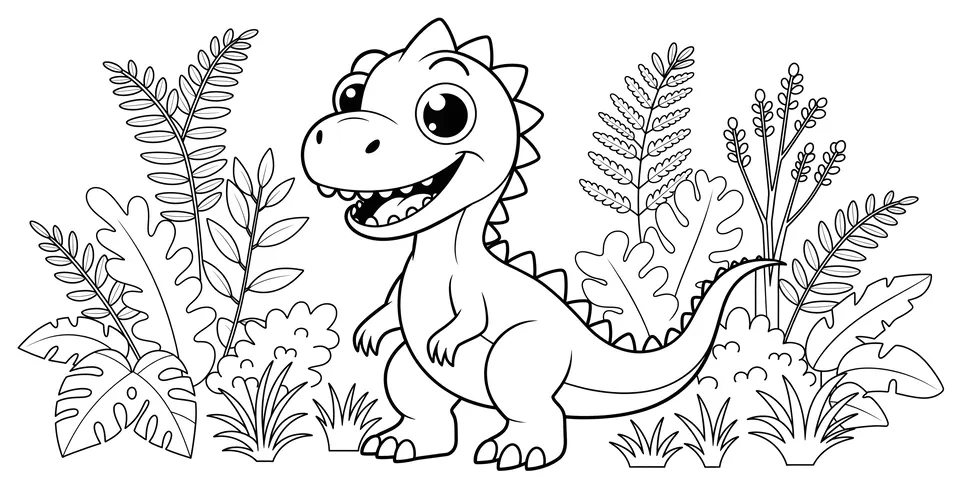
Where AI still needs you: it likes to add grey shading, textures and tiny details that make pages impossible to color. It draws six-fingered hands, melted faces and lines that don’t connect. And it doesn’t know which theme sells. That’s why a coloring book is medium content — every page is a real, designed drawing, not a repeated template — and why it only works if you check and fix every page.
05 Step by step — the complete process
All ten steps from zero to a book and a printable bundle that sell. Plan roughly three to five weeks for your first book if you work on it a few evenings a week.
This decides most of your result. Spend real time here — I wish I had at the start.
- Type theme ideas into the Amazon and Etsy search bars and note the autocomplete suggestions — those are real searches.
- Open the top 10 results. Look at the Best Sellers Rank on Amazon or the number of sales and reviews on Etsy: several steady sellers mean real demand.
- Read the 1- to 3-star reviews. “Lines too thin”, “images bleed through”, “too hard for my 4-year-old”, “pixelated” — every complaint is your chance.
- Check the covers. If the top results look cheap or cluttered, a clean, modern book stands out.
This is the detail most beginners skip — and it’s what reviews talk about most. Decide who colors the book, then design for their hands:
Write the reader and level into your book title and description, e.g. “Big & Easy” or “for Ages 4–8”. Parents search for exactly that.
Build one master prompt for the whole book and only change the subject. That keeps the style consistent. Generate several versions of every page and keep only the best.
Honestly, raw AI images are rarely print-ready. Plan time for this — it’s the difference between a 5-star and a 2-star book.
- Convert each image to pure black and white. Remove grey pixels, stray dots and noise.
- Vectorize the drawing with a tool like Vectorizer.AI, Illustrator Image Trace or Inkscape. Vector lines stay sharp at any size and look smooth in print.
- Close open lines so kids can color inside shapes. Erase weird details: extra fingers, half-merged objects, random letters.
- Adjust line thickness for your age group — thicken lines for small kids if needed.
- Export at print quality (at least 300 DPI) in the exact page size of your book.
And then: print a few pages at home and color them — or hand them to a child in your target age group. You’ll instantly see if shapes are too small, lines too thin or a picture is confusing. Remove weak pages. Twenty great pages beat fifty mixed ones.
- Choose a common trim size for your market (large formats are typical for coloring books) and keep all pages in that size.
- Use a black-and-white interior on white paper.
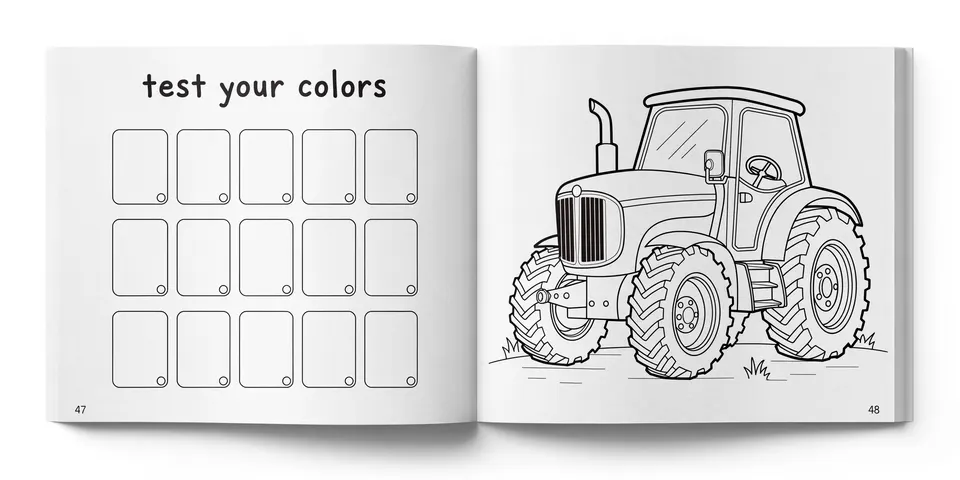
- Print pages single-sided: put a blank page (or a small “test your colors” page) behind each drawing, so markers don’t bleed through onto the next picture. Mention this in your description — buyers look for it.
- Keep important lines well away from the edges and the spine, so nothing gets cut off. Check KDP’s current margin and bleed rules in its help pages before you export.
- Add a simple first page: “This book belongs to …” and a short welcome. At the end, a friendly note asking for a review and a preview of your next book.
On Amazon your cover is a tiny image next to dozens of others. It must say “this is for you” in one second. Use a colored version of one of your best pages, a big readable title, the age or level (“Ages 4–8”, “Easy”, “Large print”) and nothing more. Test it as a thumbnail next to the top 10 books in your niche.
- Upload interior PDF and cover as a paperback. A coloring book is a real activity book, not a low-content notebook — so give it proper content and treat it that way.
- Fill the keyword fields with what parents and adults really type (from step 1): theme + age + occasion.
- Pick precise categories and write a description that sells the experience: number of pages, level, single-sided printing, who it’s for.
- When KDP asks about AI-generated content, answer honestly. AI-generated images must be declared.
- Order a printed proof copy. Check line sharpness, margins and bleed-through before launch.
- Bundle 10–30 pages per theme as a PDF download (letter and A4 size, so it works in the US and Europe).
- Create mockup images that show the real pages — one colored example, several uncolored.
- State in the description that the pages were made with AI help, and add a clear note on personal vs. classroom use.
- Offer seasonal bundles early — teachers and parents buy holiday pages weeks ahead.
- Ask friends and early buyers for honest reviews — never buy reviews.
- Share colored examples and free sample pages on Pinterest, which works very well for printables.
- Start small Amazon Ads campaigns on your best keywords and increase what works.
- Read every review: they tell you what book two should do better.
- Build a series in the same look: other seasons, other animals, easier or harder levels.
06 Tools
Start with research — it matters more than any drawing tool. Everything else you can swap later.
07 Realistic expectations
Honestly: most single coloring books sell a few copies a month. Some take off, especially around Christmas and back-to-school, many don’t — and you can’t predict which one. The people who do well treat it like a small publishing brand: several books in one or two themes, a recognisable look, printables on Etsy as a second leg, and steady improvements to covers and keywords. Sales are often seasonal, so judge your results over a full year, not a month.
08 Tips & common mistakes
- Do: Match the line thickness to the age group — and say it on the cover (“Big & Easy”, “Ages 4–8”).
- Do: Print single-sided with a blank back so markers don’t ruin the next page.
- Do: Vectorize and zoom into every page before export. Buyers do the same in the preview.
- Do: Plan seasonal books months ahead. Christmas buyers start searching in autumn.
- Avoid: Uploading raw AI images with grey shading, broken lines or six-fingered hands.
- Avoid: Using famous characters, brands or movie themes. That can get your book removed and your account blocked.
- Avoid: A random mix of styles and difficulty levels in one book.
- Avoid: Publishing dozens of rushed books instead of a few great ones. Quality and reviews win.
09 Pros & cons
- Very low start costs, no stock
- AI removes the illustrator cost
- One set of drawings sells on Amazon and Etsy
- Evergreen and seasonal demand (gifts, holidays, school)
- Easy to grow into a series or brand
- Clean-up takes real time, page by page
- Many low-quality books around — you must stand out
- Depends on Amazon’s and Etsy’s rules
- Seasonal ups and downs
- Single books rarely earn much alone
10 Risks & legal
- Trademarks & characters: No Disney, Pokémon, Paw Patrol, superheroes, brand logos or “in the style of” famous characters — not in the pages, not on the cover, not in keywords. This is the most common reason coloring books get removed.
- Copyright: Never trace or copy other artists’ pages or books. Use your own prompts and create your own designs.
- AI disclosure: Amazon asks whether content is AI-generated — images count. Etsy asks sellers to be open about AI use in listings. Answer truthfully; hiding it can cost you your account.
- AI and copyright ownership: In many countries purely AI-generated images may not be protected by copyright, so others could copy them. Your clean-up, selection and design add your own work.
- Platform quality rules: Amazon removes books it sees as disappointing (e.g. blurry, repetitive or misleading content). Etsy has its own creativity standards. Check the current rules before you upload.
- Children’s products: Keep content age-appropriate and describe the level honestly.
- Taxes: Royalties and Etsy sales are income. Check what applies to you where you live.
General information, not legal advice.
11 FAQ
Do I need to be able to draw?
No. AI creates the line art. What you need is a good eye: choosing the best version, spotting mistakes and fixing them with simple tools.
Is a coloring book a low-content book?
No. Amazon treats coloring books as activity books with real content on every page — not as repetitive, fill-in notebooks. That’s exactly why they still work: each page is a designed drawing. Treat it that way and invest in quality.
Can I use AI images in a coloring book on Amazon?
Yes. You declare them as AI-generated during upload. Make sure every page is clean and the cover honestly shows what’s inside.
How many pages should a coloring book have?
Many kids’ books have around 30–50 drawings, printed single-sided. Fewer pages in top quality beat many weak ones — and state the number clearly in the description.
Amazon or Etsy — where should I start?
Start with one printed book on Amazon, then turn the same drawings into printable bundles on Etsy. One set of work, two sales channels.
The AI Coloring Book Kit
- 60 coloring themes for kids & adults, pre-checked
- Line art prompt pack (kids, teens, adults)
- Line thickness guide by age group
- Page quality checklist before upload
- Interior + cover setup checklist for KDP
- Etsy listing template for printable pages