On this page
01 How it works
A bakery opens. A driving instructor goes self-employed. A yoga teacher wants to look professional on Instagram. All of them need the same thing: a logo, a few colors and fonts that fit together, and some ready-made templates for social media. Most of them don’t want to hire an agency. They go to a freelance marketplace like Fiverr or Upwork, compare offers and buy one.
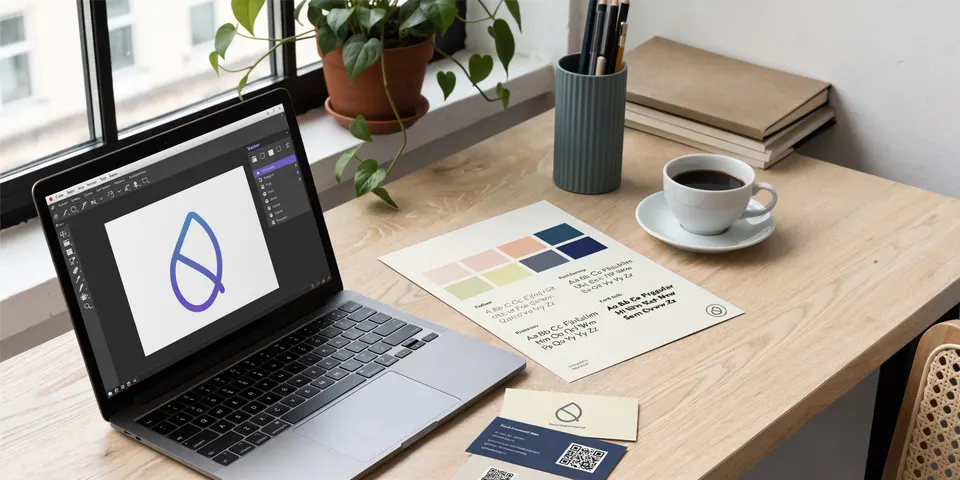
You offer that as a clear package, called a “gig” on Fiverr (a fixed service with a fixed scope) or a project/catalog offer on Upwork. The client answers your briefing questions. You research their market, collect ideas and moodboards (a collage of colors, shapes and styles that sets the direction), with AI helping. Then you design the logo yourself in a vector program, build the small brand kit around it, deliver clean files and collect a review. The reviews are what bring the next clients.
- Gig & portfolio
- Client briefing
- Research & moodboard
- Vector logo concepts
- Feedback & revisions
- Final files & brand kit
- Review & repeat
Three ways to package the same skill:
02 Is this for you?
- have an eye for clean, simple design — or really want to train it
- enjoy talking to people and understanding what their business is about
- can learn a vector program step by step (free options exist)
- like finished projects with a clear start and end
- want active income that starts faster than passive products
- want passive income that runs without you
- expect AI to spit out finished logos you just resell
- get stressed by client feedback and change requests
- can’t reply to messages within a day
- don’t want to learn any design basics at all
03 The “saturated” myth — where the money really is
Search “logo design” on Fiverr and you’ll see thousands of offers, many of them very cheap. That looks hopeless. It isn’t. Most of those gigs look the same: “I will design a modern minimalist logo”, a random portfolio, no clear customer. Buyers don’t search for “a logo”. A dentist searches for a logo for a dental practice. A food truck owner wants something that works on a truck, a menu and an Instagram profile. The more precisely your gig speaks to one kind of client, the fewer real competitors you have.

Everyone told me print-on-demand was saturated in 2018. It wasn’t, and neither is design work on marketplaces. A good logo is simple, readable and made for one specific business. Clients feel the difference immediately — and that is where cheap copy-paste offers lose.
The money sits in three places:
- A sharp niche — one industry or client type you understand, with a portfolio that shows exactly that.
- Visible quality — clean, simple vector logos that work small and in one color. Most cheap gigs fail right there.
- Consistency — fast replies, clear packages, on-time delivery. On marketplaces, reviews and response rate decide who gets shown.
Broad vs. sharp: what a good gig looks like
04 What AI changes
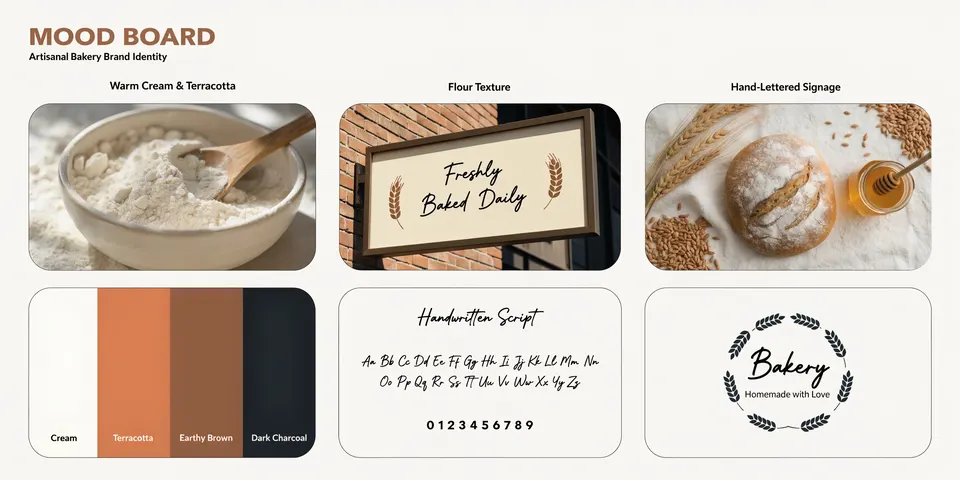
Logo design used to start with hours of manual research and sketching before you could show a client anything. Today AI helps you research a niche in minutes, turn a vague briefing into clear directions and create moodboards that show the client a feeling before you draw a single line. That makes you faster and your presentations more convincing.
Why the final logo should not be an AI image
An AI image generator produces a raster image: a picture made of pixels. A logo has to be a vector file: shapes defined by math, sharp at any size, from a favicon to a shop sign. Raw AI logos also tend to have wobbly lines, fake letters, too many details and tiny inconsistencies that fall apart in print or in one color.
The bigger problem is ownership. The U.S. Copyright Office said in its 2025 report on AI that prompts alone do not make you the author, and material whose creative choices were made by the machine isn’t protected. Where a human creates or meaningfully changes and arranges the work, that human part can be protected. Other countries are still working this out, but the direction is similar. For a logo — the one asset a business wants to own and maybe register as a trademark — that matters. So the rule in this gig is simple: AI for exploration, your own hands for the final mark. You draw the logo as a clean vector, choose and adjust the letters yourself and can explain every decision.
05 Step by step — the complete process
All ten steps from zero to a first paid project and repeat clients. Plan roughly four to eight weeks to learn the basics, build a portfolio and publish your first gig if you work on it a few evenings a week.
This is the most important step. Choose one or two client types you understand or like: cafés, trades, coaches, health practices, local shops, Etsy sellers. Then research like a buyer.
- Search Fiverr for “logo for [niche]” and note the autocomplete suggestions — those are real searches.
- Open the top gigs. What do they include? What do their reviews praise or complain about (“slow”, “didn’t listen”, “files missing”)?
- On Upwork, filter jobs for logo and branding work and read 20–30 job posts. Clients describe their pain in their own words — note it.
- Look at real businesses in your niche: signs, vans, Instagram profiles. Where do they look weak or outdated? That’s your pitch.
And no, you don’t need to be an illustrator. For most small-business logos you need a handful of skills: shapes, the pen tool, working with letters, alignment and simple color. Pick one program and stick with it: Adobe Illustrator, Affinity Designer or the free Inkscape. Follow a beginner course and redraw a few simple logos you admire as practice (for learning only, never for your portfolio).
- Learn to turn text into outlines and adjust letter spacing by hand.
- Learn to build clean symbols from simple shapes instead of freehand drawing.
- Always check your logo in black and white and very small — if it still works, it’s good.
Without reviews, your portfolio is everything. Create realistic practice projects for your niche: invent a café, a plumbing company, a yoga studio, and design the full kit for each. Or do real work at a small fee for friends and local businesses and ask for permission to show it.
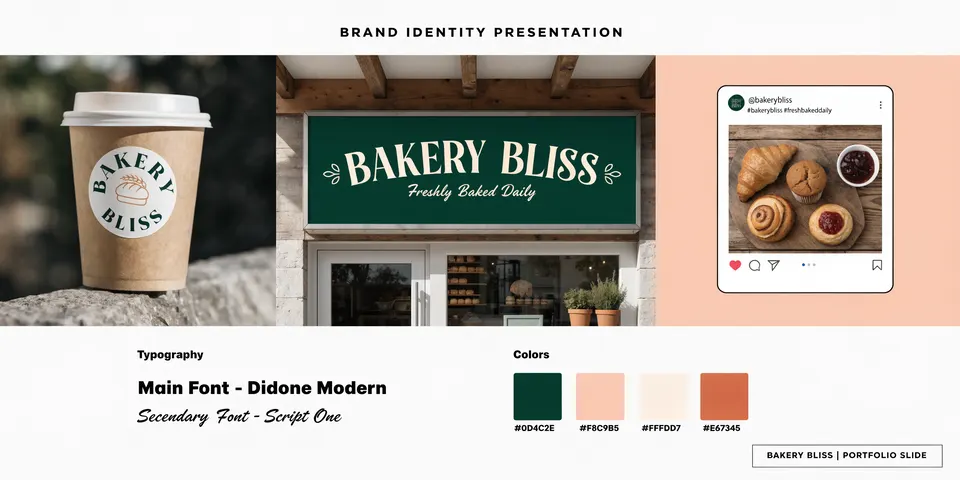
- Show each project as a small case: the brief in one sentence, the logo, color palette, fonts and 2–3 applications (sign, cup, Instagram post).
- Use mockups to show the logo in real life. AI-generated scenes for mockups are fine — just make clear which projects are concept work.
- Only show your own work. Fiverr and Upwork act on copied or stolen portfolio samples, and it can cost you the account.
Fiverr lets you offer three packages; on Upwork you can do the same with project catalog offers. Clear tiers make the decision easy and move many buyers to the middle option. Keep the scope concrete:
Write the number of concepts, revision rounds, delivery time and file formats into every package. Vague packages are the #1 source of disputes. Set your own prices by looking at comparable gigs in your niche and your experience — start fair, raise with reviews.
Good logos come from good questions. On Fiverr you can add requirements that buyers answer when they order; on Upwork, send them in the first message. Ask about:
- Business name, what they do, for whom, and where (local, online, international).
- Three words the brand should feel like — and three it should never feel like.
- Competitors they like or dislike, and why.
- Where the logo will be used: sign, vehicle, website, packaging, embroidery, social media.
- Colors they love or hate, existing materials, deadline — and whether they have a preference about AI use in the process.
Before designing, show the client a direction. Create two or three short moodboards: colors, textures, typography style, image feeling. The client picks one. That saves you from designing five logos in the wrong style.
Use these images only to talk about direction. Don’t trace AI-made logo shapes — if an AI suggestion inspires you, rebuild the idea from scratch in your own way.
- Sketch on paper first: 10–20 quick thumbnails. The best ideas are usually simple.
- Build 2–3 strong concepts in your vector program. Real fonts (with a license for commercial use), clean shapes, few colors.
- Test each one: tiny (like a profile picture), in black only, on dark and light backgrounds, on a mockup.
- Search trademark databases (like WIPO’s Global Brand Database or EUIPO’s TMview) and Google’s image search for very similar marks in the same industry. If something is too close, change it.
- Present each concept on one clean slide with a short reason: why this shape, why this font.
Revisions are part of the job, not a sign of failure. Honestly, after 300+ projects I still get them. Ask for feedback in a structured way (“What do you like? What would you change? Which concept is closest?”). Keep to the rounds in your package and mention politely when a request goes beyond it — then offer an extra, like Fiverr’s gig extras or a custom offer.
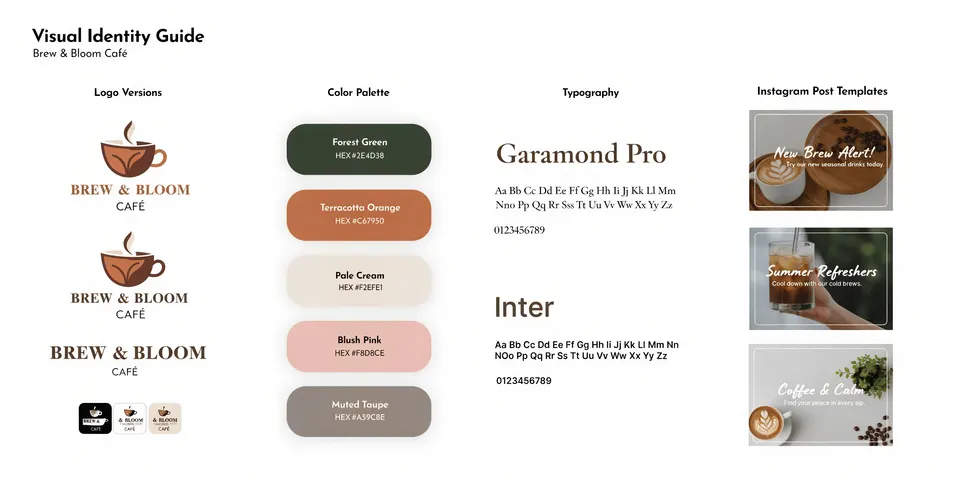
This is where you look more professional than most cheap gigs — clients remember it. Deliver an organized folder, not a random set of PNGs:
- Logo versions: main, horizontal/stacked, icon only, one-color black and white.
- Formats: vector (SVG, EPS or PDF, plus AI file if the package includes source files) for print and big sizes; PNG with transparent background and JPG for web and social.
- Color codes: HEX and RGB for screens, CMYK for print.
- Fonts: names and where to get them — check the font license allows the client’s use.
- A one-page or short brand guide: logo use, spacing, colors, fonts, do’s and don’ts.
- Social templates, for example editable Canva templates for posts and stories in the brand look.
- After delivery, thank the client and ask for honest feedback. Never buy or trade reviews — both platforms prohibit it.
- Ask if you may show the project in your portfolio. Real projects convert better than concepts.
- Offer follow-up work: flyers, menus, packaging labels, more templates. Many brand-kit clients become repeat buyers.
- Update your gig every few months: new portfolio pieces, clearer packages, refined niche.
06 Tools
Research first — it decides which clients you attract. The design tools you can swap later.
07 Realistic expectations
Honestly: the first weeks on a marketplace are often quiet. New sellers have no reviews, and many buyers pick sellers who already have some. Expect to start with smaller orders, reply fast, over-deliver on quality and let reviews build up. Upwork often works better with proposals to specific job posts, Fiverr with a sharp gig that ranks in its niche. This is active work: you earn per project, and your income depends on your time, speed and repeat clients. The people who do well pick a niche, keep a clean process and turn one-off buyers into regular clients.
08 Tips & common mistakes
- Do: Deliver every logo as a clean vector and test it tiny and in one color before you show it.
- Do: Write concepts, revisions, delivery time and file formats into every package.
- Do: Be open about how you use AI — research and moodboards yes, final logo by hand.
- Do: Show real applications in your portfolio: signs, cups, vans, social posts.
- Avoid: Selling raw AI images as logos — pixel files, glitchy letters, unclear ownership.
- Avoid: Copying famous logos or other designers’ work, or using stock icons as the core of a logo.
- Avoid: “Unlimited revisions” in the cheapest package. It invites endless work for no extra pay.
- Avoid: Using fonts without checking the license for commercial use.
09 Pros & cons
- Very low start costs, free software exists
- Buyers already come to the marketplaces
- AI makes research, moodboards and texts much faster
- Clear, finished projects with visible results
- Brand-kit clients often come back for more
- Active income — no clients, no money
- Slow start without reviews
- Many cheap offers compete on price
- Platform rules, fees and ranking can change
- Client feedback can be demanding
10 Risks & legal
- AI and ownership: In the US and many other places, purely AI-generated material isn’t protected by copyright; only real human creative work is. A logo the client can’t fully own is a weak logo. Draw the final mark yourself as a vector.
- Trademarks: Your logo must not be confusingly similar to existing brands, especially in the same industry. Check trademark databases before delivery and suggest a proper trademark search by a professional if the client plans to register it.
- Copyright & originality: Never copy other logos, trace AI outputs of existing marks or use someone else’s portfolio. Marketplaces act on non-original work.
- Fonts & assets: Only use fonts, icons and images whose licenses allow commercial logo use — some free fonts don’t. Tell the client which fonts are used.
- AI disclosure on platforms: Upwork asks freelancers to tell clients whether they use AI tools or AI content. Fiverr expects responsible, transparent AI use, work that is meaningfully customized — and you must respect a client who asks for AI-free work. Rules change, so read the current guidelines.
- Rights transfer: On Fiverr and Upwork, rights in the delivered work usually pass to the client once paid, unless agreed otherwise. Say clearly in your package what’s included (e.g. source files) and don’t reuse a client’s logo elsewhere.
- Off-platform deals & taxes: Don’t move clients off the platform against its rules. Your earnings are income — check registration and tax rules where you live.
General information, not legal advice.
11 FAQ
Can I just sell AI-generated logos?
We don’t recommend it. AI images are pixel files, often with glitches, and in many countries purely AI-generated material isn’t protected by copyright — so your client might not own their logo. Use AI for ideas and moodboards, then design the final logo as a vector yourself.
Do I have to tell clients I use AI?
Be open about it. Upwork asks freelancers to disclose AI use to clients, and Fiverr expects transparency and respect for clients who want AI-free work. A short “how I work” note in your gig solves this and builds trust.
Do I need design training?
No degree, but you need real basics: simple shapes, typography, color and one vector program. A few weeks of focused practice with a beginner course is enough to start with simple small-business logos.
Fiverr or Upwork — where should I start?
Fiverr is easier for a first fixed-price package that buyers find in search. Upwork suits people who like writing proposals to specific clients and building longer relationships. Many designers use both with the same portfolio.
What files should I deliver?
Vector files (SVG, EPS or PDF) for print and large sizes, PNG with transparent background and JPG for web, all logo versions including one-color, color codes, font names and a short brand guide. An organized folder makes you look more professional than most competitors.
The Logo Gig Starter Kit
- 3-tier gig package template (Basic / Standard / Premium)
- Client briefing questionnaire (15 questions)
- Moodboard prompt pack for AI exploration
- Vector logo quality checklist before delivery
- Final file delivery checklist (formats, folders, guide)
- Revision & scope message templates