
On this page
01 How it works
A founder needs to pitch investors next month. A consultant presents a strategy to a client’s board. A small software company sends a sales deck to every new lead. A manager has to present the yearly numbers internally. In almost every case the slides already exist — as a wall of bullet points, copied charts, five different fonts and no clear message. Nobody has time to fix it. That is where you come in.
You offer a presentation design service: the client sends you their messy deck, notes or a document. You find the story, cut the text down, build a clear structure, design clean slides in their brand look and deliver an editable file they can present from. AI tools help you with the first draft, with tightening the copy and with visuals. But what the client really buys is your judgement: what goes on the slide, what goes in the speaker notes, and what goes away.
- Find clients
- Briefing & material
- Storyline
- Copy & AI draft
- Design on brand
- Feedback & final
- Repeat & template
Three ways to package the same skill:
02 Is this for you?
- like bringing order into chaos and finding the one core message
- write clearly and enjoy cutting long text into short, strong lines
- have a feel for clean layouts — or really want to train it
- have office or corporate experience and know how meetings work
- can handle deadlines, because presentations always have a date
- want passive income that runs without you
- think AI tools will make finished decks you just resell
- don’t like reading business content like numbers, plans or products
- get stressed by last-minute changes the night before a pitch
- can’t keep client information strictly private
03 The “saturated” myth — where the money really is
“Everybody can make slides now. PowerPoint has Copilot, Google Slides has Gemini, and Gamma builds a deck in a minute.” True. And that is exactly why this service is growing, not dying. AI made it very easy to produce more slides. It did not make it easier to produce clear slides. Many decks today look polished at first glance and still say nothing. Decision-makers see dozens of them. The presentation that wins is the one with a clear story, one message per slide and numbers that are easy to understand.

After fifteen years as a senior art director in pharma and tech, my view is simple: a bad presentation is almost never a software problem. It is too much content and no clear message. AI can lay out a slide in seconds. Deciding what the audience must remember — that is still the job, and clients pay for it.
The money sits in three places:
- A sharp niche — one type of deck or one type of client. “Presentation design” is vague. “Investor decks for early-stage founders” is a clear offer.
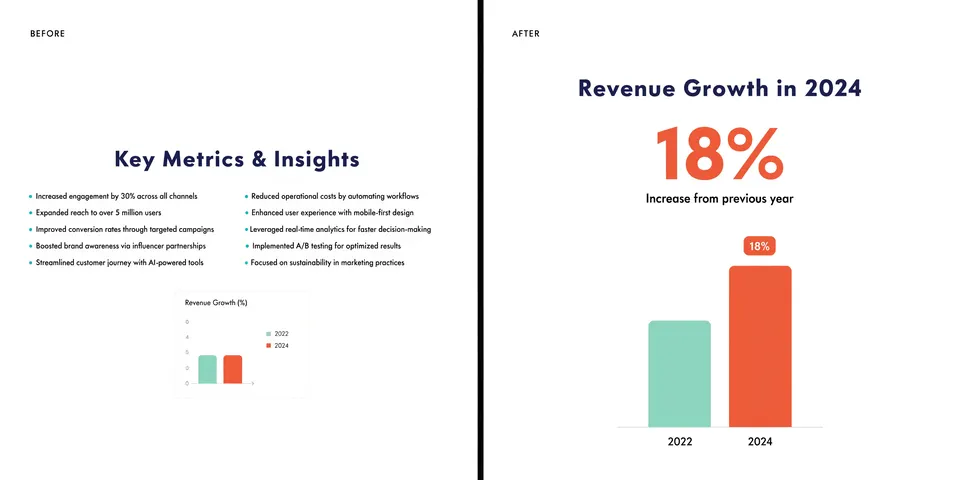
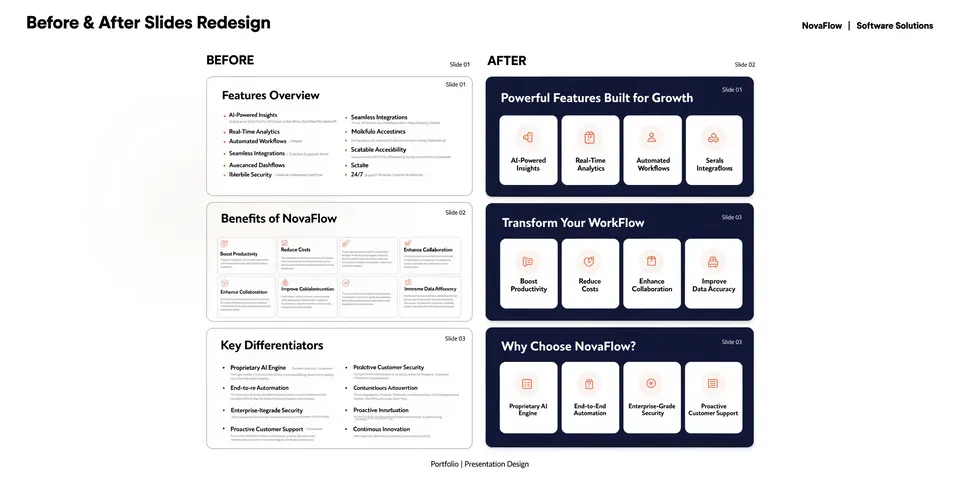
- Visible quality — before/after examples that show the difference in seconds: from 120 words per slide to one headline and one chart.
- Consistency — reliable delivery before the deadline, strict confidentiality, and a client who comes back for the next deck.
Broad vs. sharp: what a good offer looks like
04 What AI changes
Presentation work used to mean hours of copying, formatting and aligning boxes. Today the big office tools have AI built in. Copilot in PowerPoint can turn a Word document or PDF into a first deck, use an organization’s brand template and draft speaker notes. Gemini in Google Slides can generate a full, editable presentation from a prompt, use files from Google Drive as source material and match the style of an existing deck. Tools like Gamma and Beautiful.ai build complete, designed decks from an outline. That makes you much faster.
Where AI stops
AI drafts are generic by design. They fill every slide with text, love bullet lists and produce the same “modern” look for everyone. They don’t know what this investor worries about, which number the board will question or which slide can go. They also make mistakes: wrong numbers, invented facts, charts that don’t match the data. And exports between tools are not always clean — a deck built in one tool can lose fonts or layout when opened in PowerPoint. So the rule is: AI for speed, you for the story, the facts and the final design.
05 Step by step — the complete process
All ten steps from zero to a first paid deck and repeat clients. Plan roughly three to eight weeks to learn the rules, build a portfolio and get your first project if you work on it a few evenings a week.
This is the most important step. Choose one or two deck types or client groups you understand: startup pitch decks, sales decks for software companies, conference talks, consulting reports, internal management decks. Your past job is often the best starting point — if you worked in sales, sales decks are your home turf.
- Read job posts for “pitch deck”, “sales deck” and “PowerPoint designer” on Upwork, LinkedIn and freelance boards. Note the problems clients describe in their own words.
- Look at public pitch deck collections and conference talks in your niche. What do the best ones do? Where do most fail?
- Ask three people from your target group: “When did you last fight with a presentation? What was the problem?”
- Check which tools your niche uses. Corporate clients mostly live in PowerPoint, startups often in Google Slides or Pitch.
Honestly, you don’t need a design degree. You need a few clear rules and a lot of practice. Learn them in this order:
- Storyline: problem → solution → proof → next step. Every good deck follows some version of it.
- One message per slide: the headline is a full sentence that states the point (“Costs fell 30% after the switch”), not a label (“Costs”).
- Typography & grid: two fonts at most, consistent sizes, aligned elements, lots of white space.
- Charts: one chart, one point. Highlight what matters, grey out the rest.
- Master slides: learn how PowerPoint’s Slide Master and Google Slides’ theme builder work. That is what makes decks consistent and easy for the client to edit.
Clients decide in seconds. Really. Before/after examples are your strongest sales tool. Take public or self-made “bad” decks and redesign them. Invent a startup, a software company or a conference talk and build the full deck.
- Show 5–8 projects, each with 2–3 before/after slide pairs and one sentence on what you changed and why.
- Never show real client material without written permission. Many decks contain numbers or plans that must stay private.
- Create one or two sample decks in your exact niche, fully designed, as your “proof”.
Clear packages make the decision easy. Price per deck or per slide range, not per hour — clients want to know the total. Keep every package concrete:
Write the number of slides, feedback rounds, delivery time and file formats into every package. Add extras: rush delivery, extra slides, a speaker-notes script, an animated version or a PDF handout. Set your own prices by comparing similar offers and your experience — start fair, raise with testimonials.
This service sells well through trust and direct contact. Use several channels at once:
- Your network: former colleagues, managers, friends who run businesses. Tell them exactly what you do and for whom.
- LinkedIn: post one before/after slide per week with a short lesson (“Why this slide works now”). That is your best advertising.
- Partners: startup accelerators, coworking spaces, event organizers, consultants and agencies who need slides but not a full-time designer.
- Marketplaces: Upwork, Fiverr or Malt for first reviews. (Our separate article on presentation & pitch deck gigs goes deeper into that route.)
And good decks come from good questions. Ask before you touch a single slide:
- Who is the audience, and what should they do after the presentation (invest, buy, approve, remember)?
- The date, the length of the talk, and whether the deck will be presented live or sent as a file (these need different designs).
- The three things the audience must remember — if the client can’t say them, that is your first task.
- Brand materials: logo, colors, fonts, existing templates, photos.
- Which tool the client uses and who will edit the deck later.
- Confidentiality: are there numbers or plans that must not leave the company? Does the client want an NDA? Are there rules about AI tools?
Before designing, write the deck as a simple list of slide headlines. Read the headlines alone, top to bottom — they should tell the whole story. Show this outline to the client first. It saves you from designing twenty slides in the wrong order.
Then check every number and claim against the source. AI summaries are useful, but they sometimes change numbers or add things that were never said.
- Set up the master template first: fonts, colors, layouts for title, section, text, chart and image slides.
- Use AI tools for a quick first draft if it helps (Copilot, Gemini, Gamma, Beautiful.ai) — then rebuild the key slides properly in the client’s tool.
- Rebuild charts natively (not as screenshots) so the client can update the numbers.
- Add visuals: icons, simple diagrams, photos or AI images in the brand style.
- Check readability: large enough text for the back of the room, good contrast, nothing crammed.
Present the draft in a short call if possible — you can explain your choices. Collect feedback in one list, keep to the rounds in your package and offer extras politely when requests go beyond it. Then deliver:
- The editable deck in the client’s tool (PowerPoint, Google Slides, Keynote), with fonts that are installed or embedded.
- A PDF version for sending by email.
- Speaker notes, if included, and any images or icons in a separate folder.
- For template packages: the master file plus a one-page “how to use this template” guide.
- After a successful deck, offer a branded master template so the whole team can build on-brand slides themselves.
- Offer a monthly package for regular decks: sales updates, board reports, event talks.
- Ask for a testimonial and for permission to show selected slides — with sensitive details removed.
- Stay in touch before typical deadlines: funding rounds, conferences, year-end reports.
06 Tools
Research first — it decides which clients you attract and what you offer. The slide tools depend mostly on what your clients already use.
07 Realistic expectations
Honestly: the first client is the hardest. Companies share sensitive material with you, so they want to trust you first. That is why your network, before/after examples and visible LinkedIn posts matter more than anything else at the start. This is active work: you earn per project, and deadlines can be tight. The good side: presentations never stop. Every funding round, sales push, conference and year-end needs new slides. Clients who liked your first deck often come back, and a branded template can turn one project into a long relationship.
08 Tips & common mistakes
- Do: Write the headlines first. If the headlines alone tell the story, the deck works.
- Do: Ask what the audience should do after the presentation — and design toward that.
- Do: Build decks in the client’s tool with a clean master, so they can edit them later.
- Do: Treat every file as confidential and agree on AI use before you start.
- Avoid: Delivering an AI draft almost unchanged — clients notice the generic look fast.
- Avoid: Pasting confidential numbers or plans into public AI tools without permission.
- Avoid: Making slides “pretty” without fixing the message. A beautiful mess is still a mess.
- Avoid: Unlimited revisions and no fixed slide count. Decks grow — your price should too.
09 Pros & cons
- Very low start costs, often with tools you already know
- Every company needs presentations, again and again
- AI makes drafts, copy and visuals much faster
- Office experience from your old job is a real advantage
- Templates and retainers bring repeat work
- Active income — no projects, no money
- Tight deadlines and last-minute changes
- Trust takes time; first clients are hard
- You handle sensitive information and carry responsibility
- Clients may think “AI can do this for free”
10 Risks & legal
- Confidentiality & NDAs: Pitch and sales decks often contain unpublished numbers, plans and customer names. Sign an NDA (non-disclosure agreement) when asked, store files securely, delete them when the project ends if agreed, and never show them without permission.
- AI tools & client data: Pasting client material into an AI tool can break an NDA or company rules. Ask which tools are allowed, check the tool’s data settings and remove sensitive details if in doubt.
- Data protection: Decks can contain personal data (names, photos, customer lists). In the EU the GDPR applies; some clients will ask you to sign a data processing agreement.
- Copyright & licenses: Only use fonts, photos, icons and templates whose licenses allow commercial use — and check whether the client may keep using them. Don’t copy other companies’ decks or templates.
- AI images: AI visuals are fine and often better than stock, but they must not mislead: no fake product shots, fake customers or invented team members. Check the terms of the image tool for commercial use.
- Accuracy: AI can change numbers or invent facts. The client is responsible for the content, but you should flag every figure you couldn’t verify. For investor decks, wrong numbers can cause real trouble.
- Contracts & taxes: Put scope, slide count, feedback rounds, rights transfer and payment terms in writing. Your earnings are income — check registration and tax rules where you live.
General information, not legal advice.
11 FAQ
Won’t Copilot, Gemini and Gamma replace this job?
They replace the boring part: formatting, first drafts, basic layouts. They don’t decide what the audience must remember, which slide to cut or how to show a number so an investor understands it in three seconds. The more generic AI decks there are, the more a clear one stands out.
Do I need to be a designer?
No degree, but you need the basics: clear writing, a simple grid, good typography, clean charts and a solid command of PowerPoint or Google Slides. Business experience helps as much as design skills, because you have to understand the content.
Should I work in PowerPoint, Google Slides or Gamma?
Work in the tool your client uses. Most companies want an editable PowerPoint or Google Slides file. Gamma and similar tools are great for fast drafts, but check exports carefully — layouts and fonts can shift.
How do I handle confidential material?
Offer to sign an NDA, agree which AI tools you may use, store files securely and never show client slides in your portfolio without written permission. Confidentiality is part of your product — say so in your offer.
How do I get my first client without references?
Start with before/after examples you made yourself, tell your network exactly what you offer, and post one slide makeover per week on LinkedIn. A small first project for a friend’s company, done well, often leads to referrals.
The Deck Makeover Kit
- Client briefing questionnaire for presentations
- Storyline template: 10 slides for pitch & sales decks
- Before/after slide checklist (one message per slide)
- Prompt pack for structure, copy and speaker notes
- 3 package templates (Refresh / Rebuild / Deck + template)
- Simple NDA & confidentiality checklist